9 Best Smart Thermostats for Mini Split Systems (October 2026)
The best smart thermostats for mini split systems include the Cielo Breez Max Smart Thermostat for on-device controls, the Sensibo Air Smart AC Controller for simple app control, and the Sensibo Air PRO Controller with Air Quality Sensor for air quality monitoring.
On this page (6 sections)
- How we chose smart thermostats for mini split systems
- The best mini split smart thermostats for different setups
- How do you choose a Wi-Fi thermostat for a mini split?
- What should you check before installing a mini split thermostat?
- Which smart thermostat for a mini split should you choose?
- Related guides
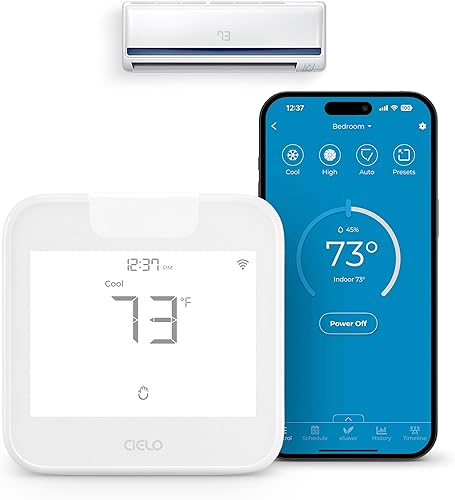
The Cielo Breez Max Smart Thermostat is the best smart thermostat for many mini split systems that use a compatible infrared remote. It combines app control with on-device touch buttons, weekly schedules and presets.
These devices don't all work like wired thermostats for central heating and cooling. Some send infrared commands like a remote, while others connect to a specific system through an interface.
Our picks at a glance
-
1
-
2

-
3
 Best for air quality monitoring
Sensibo Air PRO Controller with Air Quality Sensor
8.1/10 our score
See it on Amazon
- 4
 Check it
Sensibo Sky Smart AC Controller
Best for voice assistant support - 5
 Check it
Cielo Breez Eco Smart AC Controller
Best for local device buttons - 6
 Check it
Cielo Breez Lite Smart AC Controller
Best for a compact controller - 7
 Best for mixed infrared devicesCheck it
 - 8
 Check it
Mitsubishi Electric Wi-Fi Interface PAC-USWHS002-WF-2
Best for compatible Mitsubishi systems - 9
 Check it
MRCOOL Smart HVAC Controller Enhanced Wi-Fi Kit
Best for compatible MRCOOL ductless systems
How we chose smart thermostats for mini split systems
We compared the control method, stated compatibility, placement needs and useful smart features for each mini split controller. Compatibility came first, because an app or schedule can't help if the device cannot communicate with your indoor unit.
A remote-based controller needs to match the commands your mini split uses, and it generally needs a clear path to the indoor unit.
A brand-specific interface needs a compatible model. We also considered whether a pick adds on-device controls, scheduling, sensors, voice assistant support or multi-zone features.
Our score weighs specs, features and buyer feedback against what you're shopping for. We compared product information but did not test these devices in a home.
Read our guide to thermostat types and how to identify yours if you're not sure how your current control works. For wiring, placement and replacement questions, see thermostat fit and installation.
| Product | Best for | Control | Placement | Automation | Our score |
|---|---|---|---|---|---|
| Cielo Breez Max Smart Thermostat | on-device controls | Touch screen and app | Within 6–12 ft and line of sight of the AC | Weekly schedules, presets and geofencing | 8.4 |
| Sensibo Air Smart AC Controller | simple app control | App control for remote-controlled AC and heat pump units | Geofencing, Climate React and scheduling | 8.5 | |
| Sensibo Air PRO Controller with Air Quality Sensor | air quality monitoring | Remote AC control through connected features | 8.1 | ||
| Sensibo Sky Smart AC Controller | voice assistant support | App, remote and voice | Within 5 m and line of sight of the AC | Seven-day programming and geofencing | 8.0 |
| Cielo Breez Eco Smart AC Controller | local device buttons | App, voice assistants or device button | Within 6–12 ft and line of sight of the AC | Weekly schedules and geofencing | 7.7 |
| Cielo Breez Lite Smart AC Controller | a compact controller | App and voice assistants | Within 6–12 ft and line of sight of the AC | Weekly schedules, Comfy Mode and geofencing | 7.4 |
| SwitchBot Hub 2 | mixed infrared devices | App, voice assistants and learned infrared commands | 7.2 | ||
| Mitsubishi Electric Wi-Fi Interface PAC-USWHS002-WF-2 | compatible Mitsubishi systems | kumo cloud app or web service | 7.0 | ||
| MRCOOL Smart HVAC Controller Enhanced Wi-Fi Kit | compatible MRCOOL ductless systems | Wi-Fi-enabled controller kit | 6.8 |
The best mini split smart thermostats for different setups
Cielo Breez Max is the highest-scoring pick for compatible infrared-remote units, with on-device touch controls and weekly schedules. The other options suit different control preferences or equipment.
Start with your system's remote and model number, then choose the features that matter in the room.
Cielo Breez Max Smart Thermostat: Best for on-device controls
- Touch controls and app control
- Weekly schedules and presets
- Designed for infrared-remote mini splits
Breez Max pairs app control with touch buttons on the device. It suits a room where you want a thermostat-like interface for a compatible infrared-remote mini split.
Pros
- Touch control on the device
- Weekly schedules and presets
- Multi-zone mode coordination
Cons
- Needs a 2.4 GHz Wi-Fi network
- Placement needs line of sight to the AC
Cielo Breez Max suits people who want a thermostat-like device in the room as well as phone control. Its touch buttons let you adjust the AC on the device, while the app adds weekly schedules, presets and geofencing.
Cielo says Breez Max works with mini splits that have an infrared remote and can detect many models.
The device should sit within 6–12 ft and in line of sight of the indoor unit. It uses a 2.4 GHz Wi-Fi network.
For a multi-zone system, Cielo describes a setup with one Breez Max per indoor unit to help coordinate modes. That may help avoid conflicting mode choices across units, but confirm how your own system is configured before adding controllers.
Choose Breez Max for on-device touch control and a broad set of scheduling features. If your system is Mitsubishi Electric, compare its model compatibility with the Mitsubishi Wi-Fi interface below.
Sensibo Air Smart AC Controller: Best for simple app control
- Wi-Fi and Bluetooth setup
- Geofencing and Climate React
- Works with remote-controlled air conditioners and heat pumps
Sensibo Air adds app control, scheduling and climate features to a remote-controlled mini split. Check that your unit's remote functions work with it.
Pros
- Remote temperature control through an app
- Geofencing and scheduling
- Works with infrared-remote mini splits
Cons
- Some special remote functions may not be supported
- Needs Wi-Fi for connected control
Sensibo Air suits a mini split that already uses an infrared remote and needs app control. It connects over Wi-Fi or Bluetooth during setup, and features include geofencing, Climate React and scheduling.
The device controls the AC like a remote. The system needs to receive its infrared signal, and some special remote functions may not be supported.
Check that the everyday commands you use, such as mode and fan speed, are available for your unit.
Sensibo Air works with remote-controlled air conditioners and heat pumps, including mini splits. Placement and the remote functions supported by your unit still matter.
Choose Sensibo Air for app-based temperature control and scheduling with a compatible remote-controlled unit. If you want buttons on the controller itself, consider a Cielo Breez Max.
Sensibo Air PRO Controller with Air Quality Sensor: Best for air quality monitoring
- Built-in CO2 and TVOC monitoring
- Temperature and humidity sensing
- Geofencing and Climate React
Air PRO combines remote AC control with room air quality monitoring, including CO2 and TVOC sensing. Consider it when those readings matter alongside temperature control.
Pros
- Built-in CO2 and TVOC sensors
- Temperature and humidity features
- Geofencing and Climate React
Cons
- Some special remote functions may not be supported
- Requires a compatible remote-controlled AC
Sensibo Air PRO adds room air monitoring to remote-based mini split control. Its built-in sensors monitor CO2 and TVOC, along with temperature and humidity.
The controller also includes geofencing and Climate React features. Those can use location, temperature or humidity conditions for AC routines, but the unit still needs a compatible infrared remote and a clear signal path.
Air PRO may suit a room where air quality readings matter alongside convenient AC access. Sensor readings are room information, not a complete measure of indoor air quality or a health assessment.
Choose Air PRO if you want air quality monitoring alongside connected AC control. For app scheduling without those sensors, the regular Sensibo Air is a simpler match.
Sensibo Sky Smart AC Controller: Best for voice assistant support
- Wi-Fi app control
- Geofencing and Climate React
- Supports Alexa, Google Assistant and Siri
Sensibo Sky adds app scheduling and voice control to a remote-controlled mini split. It can suit households that want geofencing and assistant support.
Pros
- Seven-day programming
- App and voice control
- Works with remote-controlled mini splits
Cons
- Does not support Bluetooth
- Needs a direct line of sight to the AC
Sensibo Sky suits households that want app and voice control for an existing remote-controlled AC. It supports seven-day programming, geofencing and Climate React, and supports Alexa, Google Assistant and Siri.
The device needs Wi-Fi and a direct line of sight to the indoor unit.
Sensibo recommends placing it within 5 m of the AC, and older units may need it closer. Sky does not support Bluetooth.
Choose it when voice assistant support and a weekly schedule are useful. If you prefer touch controls directly on the device, Breez Max has them.
Cielo Breez Eco Smart AC Controller: Best for local device buttons
- On-device power button
- Temperature and humidity sensing
- Schedules and geofencing
Breez Eco offers app and voice control with a local power button. Its temperature and humidity sensing can support room-based schedules and comfort settings.
Pros
- Local power button
- Temperature and humidity sensing
- Schedules and geofencing
Cons
- Requires an infrared-remote AC
- Needs line of sight to the indoor unit
Cielo Breez Eco has a local power button, app control and temperature and humidity sensing. Its features include schedules, geofencing and usage history.
Cielo says Eco works with mini splits, window ACs and portable ACs that use infrared remotes. It should be placed within 6–12 ft of the indoor unit and in line of sight.
The local button is useful when you want direct power control on the device. Confirm infrared compatibility for your AC.
Choose Breez Eco for its local power button and room sensors. For a smaller controller focused on app and voice features, compare Breez Lite.
Cielo Breez Lite Smart AC Controller: Best for a compact controller
- App control without monthly subscriptions
- Weekly scheduling and geofencing
- Supports Alexa, Google Assistant and Siri Shortcuts
Breez Lite focuses on app control and common automation features for compatible infrared-remote mini splits. It also supports several voice assistant and smart home services.
Pros
- Weekly schedules and geofencing
- No monthly subscription
- Supports several smart home services
Cons
- Needs a compatible infrared remote
- Requires line of sight to the AC
Cielo Breez Lite suits buyers looking for app control with schedules and common smart home connections. It works with compatible mini splits, window ACs and portable ACs that have an infrared remote.
Its features include weekly scheduling, Comfy Mode, geofencing, usage history and air filter status. Cielo recommends placing it within 6–12 ft of the AC with a clear line of sight.
Breez Lite supports Alexa, Google Assistant and Siri Shortcuts, along with SmartThings and IFTTT. The app has no monthly subscription.
Choose Breez Lite for app control with scheduling and voice support. If local power buttons matter more, Breez Eco offers one on the device.
SwitchBot Hub 2: Best for mixed infrared devices
- Learns infrared remote controls
- Temperature and humidity monitoring
- Can trigger scenes for AC control
SwitchBot Hub 2 can learn infrared remotes and use temperature or humidity readings as automation triggers. It fits a smart home where the hub may also control other infrared appliances.
Pros
- Learns infrared remote commands
- Tracks temperature, humidity and light
- Works with scenes and geofencing
Cons
- Setup depends on the AC's infrared commands
- Not a dedicated mini split thermostat
SwitchBot Hub 2 can learn infrared remotes and track temperature, humidity and light. It can use these readings as triggers for scenes that control an air conditioner.
This hub may suit a smart home where you also want to control other infrared appliances. It isn't a dedicated mini split thermostat, so check whether its learned commands cover the AC functions you rely on.
The hub supports voice assistants and Wi-Fi features for remote control. It also includes two smart buttons for scenes, which can provide a physical way to start an automation.
Choose Hub 2 if you want to combine mini split control with broader infrared device and room monitoring features. For a controller built around mini split use, consider one of the Sensibo or Cielo options.
Mitsubishi Electric Wi-Fi Interface PAC-USWHS002-WF-2: Best for compatible Mitsubishi systems
- Connects compatible Mitsubishi indoor units to kumo cloud
- App and web control
- Works with Alexa and Google Assistant
This Wi-Fi interface connects compatible Mitsubishi indoor units to the kumo cloud service for local and remote control. Confirm your exact indoor unit before choosing it.
Pros
- Made for compatible Mitsubishi Electric systems
- App and web control
- Supports Alexa and Google Assistant
Cons
- Compatibility is limited to specified indoor units
- Some units cannot power both this interface and MHK1
The Mitsubishi Electric Wi-Fi Interface PAC-USWHS002-WF-2 is for compatible Mitsubishi indoor units. It connects a supported system to the kumo cloud app and web service for local and remote control.
Model compatibility is the key check. An MA remote controller cannot be used when an indoor unit is connected to this interface and MHK1, and only specified indoor unit families can power both devices.
Confirm your indoor unit model before choosing this interface. Check compatibility with Mitsubishi support if needed.
Choose this interface for a compatible Mitsubishi Electric system when you want app or web control. For a remote-controlled mini split from another brand, compare an infrared controller instead.
MRCOOL Smart HVAC Controller Enhanced Wi-Fi Kit: Best for compatible MRCOOL ductless systems
- Wi-Fi enabled
- Designed for MRCOOL ductless split systems
- Smart home compatible
The WMK-19 kit is intended for controlling a MRCOOL ductless split system over Wi-Fi. Confirm that your system model supports the kit before ordering.
Pros
- Designed for MRCOOL ductless systems
- Wi-Fi enabled
- DIY installation
Cons
- Compatibility details should be confirmed for your exact system
- Fewer published control details than other picks
The MRCOOL Smart HVAC Controller Enhanced Wi-Fi Kit is designed for a MRCOOL ductless split system. The available information describes it as Wi-Fi enabled, smart home compatible and intended for DIY installation.
Its compatibility information is limited, so check the exact system model before buying. Confirm which operations the kit supports for your indoor unit and whether it meets your control needs.
Choose the MRCOOL kit only after confirming your system supports it. If you cannot verify the match, a controller designed for your unit's infrared remote may be easier to assess.
How do you choose a Wi-Fi thermostat for a mini split?
Choose a Wi-Fi mini split thermostat by matching its control method to your system first. Then compare placement, app features and the number of indoor units you need to control.
Does your mini split use an infrared remote?
If your mini split responds to an infrared remote, Sensibo and Cielo controllers may be options. The controller must be able to send the commands your unit accepts, and it usually needs a clear path to the indoor unit.
Some special remote functions may not transfer. If you depend on a feature beyond power, temperature, mode, fan speed or scheduling, check compatibility for that command.
Does your system need a brand-specific interface?
A brand-specific interface can be a better match than a universal-style infrared controller when your mini split supports that accessory. The Mitsubishi PAC-USWHS002-WF-2, for example, connects to specified Mitsubishi indoor units.
Use the full model number from the indoor unit label when checking fit. For other thermostat systems, our guide to identifying your thermostat type explains why control method matters.
Where can the controller sit?
Infrared controllers need to communicate with the indoor unit. Cielo recommends 6–12 ft for Breez Max, Eco and Lite, and Sensibo Sky guidance recommends placement within 5 m with a direct line of sight.
Before installing, choose a surface or wall position that meets the controller's placement guidance. Avoid a spot hidden behind furniture or outside the room the AC is meant to control.
Which smart features will you use?
Schedules can help match AC operation to a regular routine, while geofencing can respond to location. Room sensing can add temperature or humidity triggers, and voice support may help if your household already uses a compatible assistant.
For broader guidance on smart home thermostat features, compare the services you already use with the controller's supported options. Check that the control method works with the mini split before weighing integrations.
What should you check before installing a mini split thermostat?
Before installing a smart controller, confirm the mini split model, remote type, Wi-Fi requirements and recommended placement. These checks can help you avoid buying an accessory that cannot control the system.
Keep the indoor unit's model number and current remote nearby. Check whether the controller needs 2.4 GHz Wi-Fi, a power outlet, an app account or a clear infrared path.
For a Mitsubishi interface, confirm the exact indoor unit family and any existing control accessories. For a remote-based controller, check which remote functions it supports before relying on automation for daily comfort.
If your project also involves replacing a wired thermostat, read our guide to thermostat installation and fit before changing any wiring. Mini split controllers may use a different connection method from central HVAC thermostats.
Which smart thermostat for a mini split should you choose?
Choose Cielo Breez Max Smart Thermostat if your mini split uses a compatible infrared remote and you want touch controls, app access and scheduling. Choose Sensibo Air Smart AC Controller for straightforward app control, Sensibo Air PRO Controller with Air Quality Sensor for added air monitoring, or the Mitsubishi interface when your indoor unit is confirmed compatible.
For an uncertain model match, identify the control method first and check compatibility before ordering. Our guide to thermostat types can help you decide what kind of control your system uses.
Related guides
- Thermostat fit and installation
- Thermostat system types
- What type of thermostat do you have?
- Smart home thermostat features
Our top 3 picks at a glance
-
1
-
2
-
3
Best for air quality monitoring
Sensibo Air PRO Controller with Air Quality Sensor
8.1/10 our score
See it on Amazon
Frequently asked questions
Can a smart thermostat work with any mini split?
No. Some controllers work by copying an infrared remote, while others connect only to specific system brands or models.
Check your mini split's model and remote type before buying.
A controller that supports many IR remotes may still miss special functions used by your unit.
Do mini split smart thermostats need a C wire?
Many mini split controllers do not use the same low-voltage wiring as a central HVAC thermostat. IR controllers generally communicate with the unit's remote receiver, while a brand-specific Wi-Fi interface may connect directly to a compatible indoor unit.
Follow the controller's installation instructions for your system.
Where should you place a mini split controller?
Place an infrared controller where it can communicate with the indoor unit by line of sight. Cielo recommends 6–12 ft for Breez Max, Eco and Lite, while Sensibo Sky recommends within 5 m.
Keep the device in the room it controls and follow the exact model's placement guidance.
Can one controller manage multiple mini splits?
Some systems can manage several indoor units, but the setup varies. Cielo says Breez Max can coordinate multi-zone units when you pair one device with each indoor unit.
For other controllers, check how they handle separate rooms, remotes and operating modes before planning a whole-home setup.
Is a Wi-Fi thermostat for a mini split the same as a wired thermostat?
Not always. A Wi-Fi mini split controller may imitate the handheld infrared remote or use a brand-specific interface, while a wired thermostat connects through the system's control terminals.
Identify your equipment's control method first.
Our guide to thermostat types explains common setups.


