8 Best Budget Smart Thermostats for Everyday Homes (October 2026)
The best budget smart thermostats include the Sensi Smart Thermostat ST55 for familiar button controls, the Google Nest Thermostat for automatic away adjustments, and the Amazon Smart Thermostat for Alexa households.
On this page (7 sections)
- How we chose budget smart thermostats
- Compare budget smart thermostats by controls and wiring
- The best budget smart thermostats for everyday homes
- What should you check before buying a budget smart thermostat?
- Which smart home platform should your thermostat support?
- Are schedules or automatic adjustments better for a budget thermostat?
- Which budget thermostat is the best fit?
Best Budget Smart Thermostats for Everyday Homes
The Sensi Smart Thermostat ST55 is the best budget smart thermostat for most everyday homes, with physical buttons, app access and support for several smart home systems. Nest is a good fit if you want automatic away adjustments, while Amazon's model suits homes built around Alexa.
A budget thermostat can still offer useful scheduling and remote control. The key is finding one that matches your wiring and the smart home devices you already use.
For a wider overview of thermostat styles, see our guide to thermostats for different homes and systems. If you're deciding whether connected controls justify the cost, our article on whether a smart thermostat is worth it explains the tradeoffs.
Our picks at a glance
-
1

-
2

-
3

- 4
 Best for simple app schedulingCheck it
 - 5
 Check it
Honeywell Home T5 Smart Thermostat
Best for flexible weekly schedules - 6
 Check it
Honeywell Home X2S Smart Thermostat
Best for Matter connections - 7
 Check it
meross Matter Smart Thermostat
Best for multi-platform Matter use - 8
 Best for homes without a C-wireCheck it
How we chose budget smart thermostats
We compared the features that matter most in an everyday home: controls, scheduling, app access, smart home compatibility and wiring needs. Our score weighs specs, features and buyer feedback against what you're shopping for.
A low-cost thermostat can become a poor fit if it needs wiring your system doesn't have or relies on a smart home platform you don't use. Compatibility comes first, then compare the features you'll actually use.
Compare budget smart thermostats by controls and wiring
The best fit depends on the controls and wiring your home can support. Use this table to narrow the choices, then confirm your system type before buying.
| Product | Best for | Controls | C-wire | Smart home | Our score |
|---|---|---|---|---|---|
| Sensi Smart Thermostat ST55 | familiar button controls | Buttons, app and voice | Not required in most applications | Alexa, Apple HomeKit, Google Assistant, SmartThings and Vera | 8.5 |
| Google Nest Thermostat | automatic away adjustments | Google Home app and compatible voice devices | Needed for some systems | Google Home, Google Assistant, Alexa and Matter-certified voice assistants | 8.3 |
| Amazon Smart Thermostat | Alexa households | Alexa app and compatible Alexa devices | Alexa and Ring | 8.0 | |
| Sensi Lite Smart Thermostat | simple app scheduling | App, touch and voice | Needed for some systems | Alexa, Google Assistant and SmartThings | 7.9 |
| Honeywell Home T5 Smart Thermostat | flexible weekly schedules | Touchpad and app | Alexa, Apple HomeKit and Google Assistant | 7.7 | |
| Honeywell Home X2S Smart Thermostat | Matter connections | App and buttons | Matter, Alexa, Google Assistant and Apple HomeKit | 7.4 | |
| meross Matter Smart Thermostat | multi-platform Matter use | App and voice | Apple Home, Alexa, Google Home, Home Assistant and SmartThings | 7.3 | |
| Cielo Smart Thermostat Eco | homes without a C-wire | Touch, app and voice | 7.1 |
The best budget smart thermostats for everyday homes
The Sensi Smart Thermostat ST55 leads for its familiar buttons and broad platform support, while the remaining picks suit different schedules, ecosystems and wiring situations. Compare each model's specific fit before choosing.
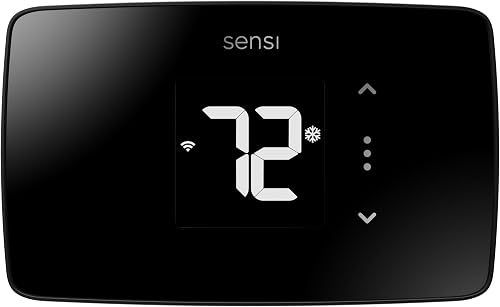
Sensi Smart Thermostat ST55: Best for familiar button controls
- Button controls
- Works without a C-wire in most applications
- Wi-Fi and remote app access
- Alexa, Apple HomeKit, Google Assistant and SmartThings
Its familiar button layout and traditional thermostat shape suit buyers who want app access without relying on a touchscreen. Sensi says a C-wire is not needed in most applications.
Pros
- Button controls
- Broad smart home compatibility
- Sensi says it does not sell personal information to third parties
Cons
- C-wire needs depend on the HVAC system
- Confirm compatibility before buying
The Sensi Smart Thermostat ST55 is the most balanced pick if you want smart features without giving up a familiar wall control. It has buttons and a shape that fits the same space as a traditional thermostat, so you may not need to patch or paint the wall when replacing one.
You can set flexible schedules, use remote access and view usage reports in the app. It also supports Alexa, Apple HomeKit, Google Assistant, SmartThings and Vera, which gives it a wide range of smart home options.
Sensi says a C-wire is not required in most applications, but that does not mean every system is compatible. Check your equipment and wiring before you buy, especially if your setup is unusual.
Choose the ST55 if you want a practical mix of on-device buttons and connected features. For a touchscreen alternative, compare it with our guide to digital thermostats for home use.
Google Nest Thermostat: Best for automatic away adjustments
- Turns itself down when you leave
- Programmable schedules in Google Home
- Remote phone, laptop or tablet control
- Works without a C-wire in most homes
Nest can lower the temperature when you leave and supports schedules in the Google Home app. Some system types need a C-wire or compatible power accessory.
Pros
- Automatic away adjustment
- Remote control
- Energy schedule suggestions
Cons
- Some HVAC systems need a C-wire or power accessory
- Voice control requires a compatible smart device
Google Nest Thermostat suits homes that want temperature changes tied to a daily routine. It can turn itself down when you leave, and you can set an energy-efficient schedule in the Google Home app.
Remote control is available from a phone, laptop or tablet. Nest also offers Savings Finder suggestions and HVAC alerts for eligible systems, though those alerts are not a substitute for a professional diagnosis.
Nest is designed to work without a C-wire in most homes, but some heating-only, cooling-only, zone-controlled and heat pump systems need a C-wire or compatible power accessory. Use Google's compatibility checker before buying if your system falls into one of those groups.
Pick Nest if automatic away adjustments and Google Home scheduling matter more than having traditional buttons. If your smart home platform is the main deciding factor, see our smart thermostat guide for Alexa, Google and Apple.
Amazon Smart Thermostat: Best for Alexa households
- Alexa app control
- Home, away and sleep schedules
- Can connect with select Alexa devices for comfort zones
- DIY installation guidance in the Alexa app
Amazon's thermostat fits homes already organized around Alexa, with app control and familiar daily schedule options. Select Alexa devices can help create comfort zones using temperature readings or presence detection.
Pros
- App-guided installation
- Home, away and sleep schedules
- Works with select Alexa devices
Cons
- Best fit depends on an Alexa-centered setup
- Check system wiring and compatibility before buying
Amazon Smart Thermostat is the straightforward choice for a household that already uses Alexa. It supports home, away and sleep schedules, and the Alexa app lets you monitor and adjust the temperature when you're away.
Amazon says you can connect select Alexa devices to create comfort zones using temperature readings or presence detection. The Alexa app also guides you through DIY installation, with customer service available if you need help.
It uses Honeywell Home thermostat technology. Amazon says it can send details about rebates that may be available through local energy providers after purchase.
Choose it if you want a schedule-based thermostat that fits Alexa. If you rely on Google Home or Apple HomeKit, compare supported platforms before choosing it over the Sensi Smart Thermostat ST55 or Google Nest Thermostat.
Sensi Lite Smart Thermostat: Best for simple app scheduling
- Wi-Fi app control
- Flexible schedules and geofencing
- Works without a C-wire in most homes
- Sensi says it does not sell personal information
Sensi Lite offers remote app control and scheduling for buyers who want a straightforward smart upgrade. It usually works without a C-wire, though some heating, cooling and heat pump systems need one.
Pros
- Remote app control
- Flexible scheduling and geofencing
- Built-in level and step-by-step installation instructions
Cons
- Some systems need a C-wire or compatible power accessory
- Check compatibility for your HVAC setup
Sensi Lite offers remote control and flexible scheduling. Its app supports geofencing and usage reports, so you can adjust settings from a phone and plan temperature changes around your routine.
Sensi says the Lite works without a C-wire in most homes, but heating-only, cooling-only and heat pump systems may need a C-wire or compatible power accessory. It supports Alexa, Google Assistant and SmartThings.
The built-in level and step-by-step instructions support DIY installation. Your wire setup and HVAC equipment determine whether it is compatible.
Choose Sensi Lite if app control and basic scheduling are your priorities. The Sensi Smart Thermostat ST55 is a better match if you prefer physical buttons and broader platform support.
Honeywell Home T5 Smart Thermostat: Best for flexible weekly schedules
- Seven-day flexible scheduling
- Location-based temperature control
- ENERGY STAR certified
- Works with Alexa, Apple HomeKit and Google Assistant
The T5 offers either a weekly schedule or location-based temperature changes, giving you a choice in how it adjusts through the day. Check the C-wire requirement before you buy.
Pros
- Flexible weekly schedule
- Location-based control
- ENERGY STAR certified
Cons
- Some systems need a C-wire power adapter
- Not compatible with heating-only oil systems unless a C-wire is present
Honeywell Home T5 suits a household that wants to set a weekly routine or let location-based control respond to comings and goings. Its seven-day schedule gives you a way to program temperature changes for different days.
Honeywell Home reports that frequent use of the T5 scheduling feature saved customers between 8% and 16% on heating and cooling bills. Actual savings vary with consumption, and a thermostat can't guarantee a specific reduction.
Check whether your system needs a C-wire power adapter before choosing it. The T5 works with most heat/cool oil furnace systems, but it will not work with heating-only oil systems unless a C-wire is present.
Pick the T5 if its schedule choices and supported smart home platforms match your needs. If you're comparing Honeywell models, our Honeywell thermostat guide covers more options.
Honeywell Home X2S Smart Thermostat: Best for Matter connections
- Matter certified
- Wi-Fi and app control
- Flexible weekly schedules and auto-away
- Humidity display option and filter reminders
The X2S is a budget-minded option if Matter support matters to your smart home setup. It requires a C-wire and does not work with 120–240 V electric baseboard heat.
Pros
- Matter certified
- Flexible schedule options
- Filter reminders and optional humidity display
Cons
- C-wire required
- Not for electric baseboard heat
Honeywell Home X2S adds Matter certification and flexible scheduling. It works with the First Alert app and is also compatible with Alexa, Google Assistant and Apple HomeKit.
You can choose a seven-day, 5-1-1, 5-2 or one-week schedule, or set it as non-programmable. The thermostat also offers auto-away, filter reminders and an option to display indoor humidity.
The X2S requires a C-wire and does not work with electric baseboard heat at 120–240 V. It supports certain conventional and heat pump systems, so check the system limits before buying.
Choose it if you want Matter support and already have a C-wire. If you need help identifying your equipment, start with how to tell what type of thermostat you have.
meross Matter Smart Thermostat: Best for multi-platform Matter use
- Matter integration
- 24/7 flexible scheduling
- Remote app control
- Smart alerts for filter life and system issues
Meross supports Matter across several smart home platforms and offers flexible schedules through its app. Some wiring setups need a C-wire, and it is not made for electric baseboard heaters.
Pros
- Matter support across several platforms
- Flexible weekly schedules
- Filter and system alerts
Cons
- Some wiring setups need a C-wire
- Not for electric baseboard heat, millivolt systems or two-wire systems
meross Matter Smart Thermostat fits a home that uses Matter platforms and wants a flexible weekly schedule. It integrates with Apple Home, Amazon Alexa, Google Home, Home Assistant and Samsung SmartThings.
The thermostat offers 24/7 schedules, remote app control and alerts for filter life and system issues. Some wiring setups require a C-wire, and the C-wire is not included.
meross says the thermostat suits many HVAC types, including heat pumps, air conditioners, furnaces and boilers. It is not suitable for 110 V, 120 V or 240 V electric baseboard heaters, millivolt thermostats or two-wire systems.
Choose the meross Matter Smart Thermostat if Matter support across several platforms is the deciding feature. Confirm your wiring and system type first, especially if you have a less common setup.
Cielo Smart Thermostat Eco: Best for homes without a C-wire
- C-wire adapter included
- Schedules for home, away and sleep
- Remote app control
- Works with Alexa, Google Assistant and SmartThings
The included C-wire adapter may help when your current wiring lacks a common wire. Cielo says the thermostat works with most 24 V HVAC systems, including heat pumps and conventional systems.
Pros
- C-wire adapter included
- Schedules and vacation mode
- Remote app control
Cons
- Confirm compatibility with your exact system
- Does not fit every HVAC setup
Cielo Smart Thermostat Eco is worth considering when your central HVAC setup lacks a C-wire. Its C-wire adapter is included, and it works with most 24 V systems, including gas, electric, oil, hot water, heat pump and geothermal equipment.
The app supports home, away and sleep schedules, vacation mode and remote control. Smart home options include Alexa, Google Assistant, Siri Shortcuts, SmartThings, IFTTT and Home Assistant.
Cielo supports conventional systems up to two heating and two cooling stages, and heat pumps with auxiliary heat. Compatibility still depends on your exact wiring and equipment, so confirm those details before installing.
Pick the Cielo Smart Thermostat Eco if the included adapter and broad central HVAC compatibility fit your situation. It earns the last spot here because the other picks offer a clearer match for common platform or control preferences.
What should you check before buying a budget smart thermostat?
Check your HVAC type, wiring and preferred app before comparing extra features. These details decide whether a smart thermostat can control your system and whether its connected features will fit your home.
Start by identifying whether you have central heating and cooling, a heat pump, electric baseboard heat or another system. Then look at the wires behind your current thermostat and use the brand's compatibility tool where available.
A C-wire requirement can rule out a model or add installation work. The Cielo includes an adapter, while Honeywell Home X2S requires a C-wire and Sensi says the ST55 works without one in most applications.
If you're unsure about the wiring, see our guide to changing a thermostat safely. For system-specific options, our thermostat guide for baseboard heaters covers a different type of heating system.
Which smart home platform should your thermostat support?
Choose a thermostat that works with the platform you already use for routines and voice control. This keeps everyday adjustments in the same app or ecosystem as your other devices.
Sensi Smart Thermostat ST55 supports Alexa, Apple HomeKit, Google Assistant, SmartThings and Vera. Google Nest Thermostat centers on Google Home but also supports compatible Alexa devices and Matter-certified voice assistants.
Amazon Smart Thermostat fits Alexa, while Honeywell Home X2S and meross Matter Smart Thermostat add Matter support. Sensi Lite supports Alexa, Google Assistant and SmartThings, and Cielo supports several voice and smart home options.
For a platform-by-platform comparison, read our guide to smart thermostats for Alexa, Google and Apple. If a thermostat needs a compatible device for voice control, account for that before you decide.
Are schedules or automatic adjustments better for a budget thermostat?
Schedules work well when your household follows a steady routine, while automatic adjustments can help when plans change. Pick the approach you'll maintain instead of paying for features you won't use.
Amazon Smart Thermostat offers home, away and sleep schedules, and Honeywell Home T5 supports a seven-day schedule. Honeywell Home X2S provides several weekly programming patterns, while the Sensi models offer flexible scheduling.
Google Nest Thermostat can turn itself down when you leave and suggests schedule changes through Savings Finder. Sensi Lite also includes geofencing, and Honeywell Home T5 offers location-based temperature control.
Automatic settings still need to match how you use your home. Review the schedule or app settings after installation, then adjust them when your routine changes.
Which budget thermostat is the best fit?
The Sensi Smart Thermostat ST55 is the best all-around pick if you want buttons, app access and broad smart home support. Its traditional control style makes it a practical upgrade for someone who doesn't want every adjustment to depend on a phone.
Pick Google Nest Thermostat if automatic away adjustments and Google Home schedules matter most. Choose Amazon Smart Thermostat if you already use Alexa, or Honeywell Home X2S if Matter and a C-wire fit your setup.
For an option with a C-wire adapter in the box, consider the Cielo Smart Thermostat Eco after checking system compatibility. If the wiring is uncertain, identify your thermostat and HVAC setup before buying.
Our top 3 picks at a glance
-
1
-
2
-
3
Frequently asked questions
What is the best budget smart thermostat?
The Sensi Smart Thermostat ST55 is a strong budget pick if you want physical buttons, app access and support for several smart home platforms. Sensi says a C-wire is not needed in most applications.
For a Google Home household, consider Nest.
For an Alexa-centered home, Amazon's thermostat may fit better.
Do budget smart thermostats need a C-wire?
Some do, and the requirement varies by thermostat and HVAC system. Sensi ST55 says a C-wire is not required in most applications, while Honeywell Home X2S requires one.
Check your current wiring and the thermostat's compatibility guidance before buying.
Ask an HVAC professional if your wiring or system type is unclear.
Can a smart thermostat work without Wi-Fi?
The smart features in these picks rely on Wi-Fi for app access and remote control. Local thermostat controls may still be available, but the exact offline functions vary by model.
If your internet drops often, choose a model with on-device controls that you find easy to use.
Are budget smart thermostats hard to install?
Installation depends on your wiring and HVAC system. Sensi and Amazon describe app-guided DIY installation, while Nest also provides an online compatibility checker.
Turn off power before working with thermostat wiring, follow the model's instructions, and stop if wire labels or system connections do not match.
Will these thermostats work with electric baseboard heat?
Do not assume a smart thermostat for central HVAC will work with electric baseboard heat. Honeywell Home X2S and meross specifically exclude 120–240 V electric baseboard systems.
Identify your system type and voltage first, then confirm compatibility for the exact thermostat.


