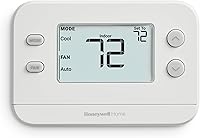
Best Thermostats for Your Home: Smart, Digital and Basic
The best thermostat for your home is one that works with your HVAC system and fits how you control the temperature. Choose a smart model for app access, a programmable one for set schedules, or a basic thermostat for simple manual changes.
On this page (10 sections)
- What is the best thermostat for home use?
- What should you check before buying a thermostat?
- Should you choose a smart or basic thermostat?
- Which thermostat types should you compare?
- Which thermostat fits your needs?
- How do you compare thermostat features?
- When should you choose a digital thermostat?
- How do you know what type of thermostat you already have?
- What should you do before installation?
- How do you choose the best thermostat for home comfort?
The best thermostat for home use matches your heating and cooling system, wiring and daily routine. Choose a smart thermostat for app control and connected features, a programmable digital model for a recurring schedule, or a basic thermostat for straightforward manual changes.
Compatibility comes first. A thermostat that looks right or has useful features can still be the wrong fit if it does not support your equipment or wiring.
This guide compares smart and programmable options, explains what to check before choosing, and shows where a simple model can make more sense. For other setup questions, start with our thermostat fit and installation guide.
What is the best thermostat for home use?
The best thermostat for your home is the one that supports your HVAC equipment and gives you controls you will use. Start with system compatibility, then compare scheduling, app access, display and wiring needs.
A smart thermostat may let you adjust settings through an app, set schedules or use voice control with compatible devices.
A programmable thermostat can follow a routine without requiring connected features. A basic model may suit a household that wants simple local controls.
| Your priority | Type to consider | Check before you choose |
|---|---|---|
| Change the temperature remotely | Smart thermostat | Wi-Fi, app requirements and HVAC compatibility |
| Set a repeating routine | Programmable thermostat | Available schedule options and supported system |
| Keep controls simple | Basic or non-programmable thermostat | Display, buttons and system compatibility |
| Control a mini split | Model made for that setup | Whether it supports your specific mini split |
| Use voice control | Smart thermostat | Compatible assistant and any required device |
These are starting points, not a substitute for checking your system. Equipment type, heating and cooling stages, and wiring can change which thermostats are suitable.
What should you check before buying a thermostat?
Check your HVAC system and wiring before comparing extra features. Write down what the current thermostat controls and identify the equipment it connects to if you can.
Look for the manufacturer and model number on the existing thermostat or your HVAC equipment paperwork.
Note whether your home uses a furnace, heat pump, boiler or another setup, and whether it has heating, cooling or both. If the system has multiple stages or zones, include that information in your compatibility check.
Wiring labels can help, but wire color alone does not confirm what each wire does.
Take a clear photo of the connections before removing anything, and follow the thermostat maker's instructions. If you're unsure about the wiring or equipment, ask a qualified HVAC professional to identify it.
Does the thermostat support your HVAC system?
A thermostat must support the type and stages of your heating and cooling equipment. Check its compatibility guidance against the system in your home rather than assuming that a common thermostat will work.
For example, the Honeywell Home X2P supports single-stage 1 heat/1 cool equipment and several listed heating systems. It does not support electric baseboard heat at 120–240 V or multi-stage systems, so those limits matter before you consider its schedule and display.
Mini splits need particular attention because compatibility can depend on the system and control method. See our guide to smart thermostats for mini split systems if that is the equipment you need to control.
Does the thermostat need a C-wire?
C-wire needs vary by thermostat model and HVAC setup. Some devices work without a common wire in many homes, while certain system types may need a C-wire or a compatible power accessory.
The Google Nest Thermostat is designed to work without a C-wire in most homes. Some heating-only, cooling-only, zone-controlled and heat-pump systems may need a C-wire or compatible power accessory.
The Sensi Smart Thermostat ST55 does not require a common wire in most applications. The Honeywell Home RTH9585WF Wi-Fi Color Thermostat requires a C-wire.
Check the compatibility guidance for the exact thermostat and your equipment before buying.
If you're replacing an older unit, don't assume that its wiring arrangement will carry over unchanged. Our guide to changing a thermostat covers the checks to make before starting a replacement.
Should you choose a smart or basic thermostat?
Choose a smart thermostat when you want connected controls and expect to use them. Choose a basic or non-programmable model if you mainly want to adjust the temperature at the wall.
Smart features can include remote app access, schedules, usage reports, alerts or voice control.
Those options vary by model, and some require Wi-Fi, an account, a compatible phone or another smart device. Consider what you will actually use rather than treating a longer feature list as automatically better.
A basic thermostat can make more sense if you don't want to manage an app or connect a device to your home network. A digital display does not necessarily mean the thermostat has Wi-Fi or remote control, so compare the actual controls and connectivity.
If you want to compare connected options by voice assistant, see our guide to smart home thermostats for Alexa, Google and Apple. For a closer look at the features and trade-offs, read what a smart thermostat does.
Which thermostat types should you compare?
Compare smart, programmable and basic thermostats by their controls and features, then rule out any model that does not support your system. The labels can overlap: a digital thermostat may also be programmable, and a smart thermostat may include scheduling.
Smart thermostats
Smart thermostats connect to a home network for features such as remote control through an app. Depending on the model, they may also work with a compatible voice assistant or offer usage reports and system alerts.
The Google Nest Thermostat offers Wi-Fi, remote control through the Google Home app, schedules and support for compatible voice assistants.
The Sensi Smart Thermostat ST55 offers Wi-Fi, flexible scheduling, remote access and usage reports. Remote functions require internet access.
Consider the setup as well as the features. If you would rather not use connected controls, a simpler thermostat may better suit your routine.
Programmable thermostats
Programmable thermostats let you set temperatures around a repeating schedule. They can suit predictable routines, such as regular times when the home is occupied or empty.
The Honeywell Home X2P Programmable Thermostat offers a 5-2 day schedule, with separate programming for weekdays and weekends, and it also has a non-programmable option. The Honeywell Home RTH9585WF Wi-Fi Color Thermostat offers flexible programming options and Wi-Fi controls.
A schedule only helps if it reflects your actual routine. If your days change often, think about whether you'll update the schedule or prefer to make adjustments manually.
Basic and non-programmable thermostats
A basic thermostat suits people who want to change settings at the wall without app controls or a recurring schedule. Its appeal is simple operation, so focus on readable controls and compatibility.
Digital displays can make settings easier to read than a dial, but display type alone does not describe how the thermostat works. Check whether it uses buttons or a touchscreen, how it handles temperature changes and whether it offers a schedule.
If you are deciding between fixed schedules and manual control, compare the trade-offs in our programmable vs. non-programmable thermostat guide.
Which thermostat fits your needs?
Match a thermostat to the feature that solves your main problem, while keeping system compatibility as the first filter. These examples show how the four models differ based on their stated features.
Google Nest Thermostat
The Google Nest Thermostat suits a home that wants app-based control and scheduling. It connects by Wi-Fi and supports remote adjustments through the Google Home app.
Google says the thermostat can turn itself down when you leave and offers Savings Finder suggestions in the app. It also provides alerts about potential issues with eligible HVAC systems.
These alerts are informational and are not a diagnosis.
Its C-wire needs depend on the system. It is designed to work without one in most homes, but some setups may need a C-wire or compatible power accessory.
Check the Google Nest Compatibility Checker before choosing it.
Consider it if you want remote control through Google Home. First make sure your HVAC system and wiring fit.
Sensi Smart Thermostat ST55
The Sensi Smart Thermostat ST55 suits buyers who want Wi-Fi features with buttons and a familiar thermostat layout. Sensi says it fits the same space as a traditional thermostat, which may help if you want to avoid patching and painting the wall.
Sensi says the model can help save energy through flexible scheduling, remote access and usage reports. It also offers equipment alerts and maintenance reminders, including filter replacement reminders.
A common wire is not required in most applications, but your setup still needs a compatibility check. Consider it if you want connected features with button controls.
Honeywell Home X2P Programmable Thermostat
The Honeywell Home X2P Programmable Thermostat suits a home with compatible single-stage equipment and a weekday/weekend schedule. It also offers a non-programmable option if you prefer not to use scheduling.
Its compatible systems include single-stage forced air, hot water heat, single-stage heat pumps and 750 mV systems. It does not support electric baseboard heat at 120–240 V or multi-stage systems.
The thermostat uses 2 AA batteries, which are not included, and does not require a C-wire. Consider it if its system limits match your equipment and you want an option for scheduled or manual operation.
Honeywell Home RTH9585WF Wi-Fi Color Thermostat
The Honeywell Home RTH9585WF Wi-Fi Color Thermostat suits buyers who want Wi-Fi control and a customizable color touchscreen. It offers flexible programming and can be controlled from the screen, a mobile app or compatible Amazon Alexa and Google Home setups.
Honeywell Home says the thermostat provides monthly energy reports and personalized tips. It supports listed forced-air, hot-water and steam systems, as well as heat pumps with electric backup.
It requires a C-wire and does not work with electric baseboard heat at 120–240 V. Consider it if you want touchscreen controls and your wiring and system meet those requirements.
How do you compare thermostat features?
Compare features by the task you want the thermostat to handle. A short checklist can help you avoid paying attention to features that won't fit your setup or routine.
| Feature | Ask yourself |
|---|---|
| System support | Does it support my heating and cooling equipment and stages? |
| Wiring | Does it need a C-wire or a compatible accessory? |
| Scheduling | Do I want recurring temperature changes? |
| Remote access | Will I use an app to adjust settings away from home? |
| Voice control | Is my assistant supported, and do I have a compatible device? |
| Display | Can everyone who uses it read and operate the controls? |
| Maintenance reminders | Would filter or equipment alerts help my routine? |
Features have different requirements. Remote app access depends on Wi-Fi and internet service, while voice control can require a compatible smart device.
Read the setup guidance for the specific model before assuming a feature will work in your home.
ENERGY STAR certification may be another point to compare. The Google Nest Thermostat, Sensi Smart Thermostat ST55 and Honeywell Home RTH9585WF Wi-Fi Color Thermostat are ENERGY STAR certified.
The ENERGY STAR thermostat page explains the program and helps you explore certified smart thermostat options.
When should you choose a digital thermostat?
Choose a digital thermostat if you want a screen to read and adjust settings, then check whether you also need scheduling or connected controls. “Digital” describes a display style, not a full set of features.
A digital thermostat might be programmable or non-programmable, wired or Wi-Fi connected. A touchscreen is different from button controls, and a digital screen does not by itself mean you can use an app.
If an easy-to-read screen is your main need, compare the display size, font and controls. Our digital thermostats for home guide covers options with digital displays.
How do you know what type of thermostat you already have?
Identify your current thermostat by checking its model number, controls and connected system. Those details can help you compare features and wiring before you replace it.
Look for a model number on the thermostat face, inside the battery compartment or behind the front cover, following the maker's instructions for safe access. Note whether it has a dial, buttons or touchscreen, whether it uses batteries and whether it shows a schedule or Wi-Fi settings.
Then check the HVAC equipment it controls. A thermostat's appearance alone may not reveal whether it supports a heat pump, multiple stages or a separate zone system.
Our guide to identifying your thermostat type explains what to look for.
If the controls are unclear or you cannot identify the wiring safely, ask a qualified HVAC professional. A correct model match matters more than matching the old thermostat's appearance.
What should you do before installation?
Before installing a thermostat, confirm the model supports your system and follow its specific setup instructions. Turn off power to the HVAC equipment as directed by the maker, and label or photograph the wires before disconnecting anything.
Read the installation guide before you remove the old thermostat. Check whether the new model needs a C-wire, batteries, a wall plate or another compatible power accessory, and make sure the mounting location and wire labels match the instructions.
If you find unfamiliar wires, a system type the thermostat doesn't support or instructions that don't match your setup, stop and get help from an HVAC professional. A compatibility check before buying can save time and avoid a thermostat that cannot control your equipment.
How do you choose the best thermostat for home comfort?
Choose the best thermostat for home comfort by matching the HVAC system first, then choosing the controls you'll use. Pick the Google Nest Thermostat or Sensi Smart Thermostat ST55 if you want Wi-Fi features and app access, the Honeywell Home X2P Programmable Thermostat if its system support and schedule fit, or the Honeywell Home RTH9585WF Wi-Fi Color Thermostat if you want its color touchscreen and your wiring includes a C-wire.
Before you decide, verify the system type, stages and wiring against the thermostat maker's compatibility guidance. If you need help with setup, continue to our thermostat fit and installation guide.
Frequently asked questions
What is the best thermostat for home use?
The best thermostat for home use matches your HVAC system, wiring and preferred controls. Choose a smart thermostat if you want app access and connected features, a programmable model if a repeating schedule is enough, or a basic thermostat if you prefer manual adjustments.
Check compatibility before buying.
Are smart thermostats better than digital thermostats?
Smart thermostats add connected features such as remote app control, while digital thermostats may offer a screen and scheduled settings without the same app features. The better choice depends on whether you will use remote access, voice control or automation.
Confirm that the model supports your heating and cooling equipment.
Do all thermostats work with every HVAC system?
No. Thermostats support particular system types, stages and wiring arrangements, so a model that works with one home may not work with another.
Check the thermostat's compatibility guidance against your equipment and existing wires, especially for heat pumps, electric baseboard heat and systems with multiple heating or cooling stages.
Do I need a C-wire for a smart thermostat?
Some smart thermostats are designed to work without a C-wire in many homes, but certain system types may still need one or a compatible power accessory. Requirements vary by model and HVAC setup.
Check the thermostat maker's compatibility guidance before you remove the old thermostat or buy a new one.
Should I choose a programmable or non-programmable thermostat?
Choose a programmable thermostat if you want heating or cooling settings to follow a repeating routine. A non-programmable model suits people who prefer to change the temperature manually.
Some thermostats offer both options, so check the controls and scheduling choices against how you use your home.