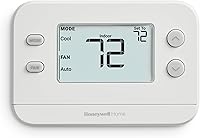
8 Best Easy-to-Read Thermostats for Seniors (October 2026)
The best easy-to-read thermostats for seniors include the Honeywell Home RTH9585WF Wi-Fi Color Thermostat for a bright color screen, the Sensi Touch 2 Smart Thermostat for app-guided setup, and the Honeywell Home X2P Programmable Thermostat for a large screen and schedule.
On this page (5 sections)
The best easy-to-read thermostat for most seniors is the Honeywell Home RTH9585WF Wi-Fi Color Thermostat, which pairs a bright touchscreen with flexible programming. If you want fewer settings, choose a large-screen model with no schedule or a familiar manual dial.
A clear display matters, but the controls should fit the way you use heat and cooling. A touchscreen can show the current temperature and set point together, while a manual model avoids menus and programming.
For a broader overview of screen and control styles, see our guide to the best digital thermostats for home use. If you are deciding between scheduled and direct temperature control, our programmable vs. non-programmable thermostat guide explains the tradeoffs.
Our picks at a glance
-
1
 Best for a bright color screen
Honeywell Home RTH9585WF Wi-Fi Color Thermostat
8.3/10 our score
See it on Amazon -
2

-
3
 Best for a large screen and schedule
Honeywell Home X2P Programmable Thermostat
8.2/10 our score
See it on Amazon
- 4
 Check it
Honeywell Home RTH7600D Touchscreen Thermostat
Best for a weekly touchscreen schedule - 5
 Check it
Honeywell Home 7-Day Touchscreen Thermostat
Best for a blue backlit screen - 6
 Check it
Lux TX9600TS Large Touchscreen Thermostat
Best for a wide touchscreen - 7
 Check it
Honeywell Home X1N Non-Programmable Thermostat
Best for simple temperature changes - 8
 Check it
Honeywell Home Round Heat-Only Thermostat
Best for a familiar dial
How we chose easy-to-read thermostats for seniors
We compared display clarity, control style, scheduling, and compatibility details for people who want simple daily temperature adjustments. A large screen can help, but the right choice also depends on how much programming you want to manage and what HVAC system you have.
The scores reflect how each thermostat's documented features match this article's focus on readability and straightforward operation. Our score weighs specs, features and buyer feedback against what you're shopping for.
Check your system type and wiring before ordering. For help identifying the equipment, read what type of thermostat you have at home, then compare the best thermostats for your home for more control styles.
| Product | Best for | Display | Schedule | Power | Our score |
|---|---|---|---|---|---|
| Honeywell Home RTH9585WF Wi-Fi Color Thermostat | a bright color screen | Color touchscreen | Flexible programming | C-wire required | 8.3 |
| Sensi Touch 2 Smart Thermostat | app-guided setup | LCD touchscreen | C-wire required | 8.2 | |
| Honeywell Home X2P Programmable Thermostat | a large screen and schedule | Backlit LCD | 5-2 day or non-programmable | 2 AA batteries, not included | 8.2 |
| Honeywell Home RTH7600D Touchscreen Thermostat | a weekly touchscreen schedule | Backlit touchscreen | 7 days, 4 periods per day | 1 AAA battery required | 7.9 |
| Honeywell Home 7-Day Touchscreen Thermostat | a blue backlit screen | Blue backlit touchscreen | Daily, weekend or weekly | Battery or hard-wire | 7.6 |
| Lux TX9600TS Large Touchscreen Thermostat | a wide touchscreen | LCD touchscreen | 7 days | 2 AA batteries required | 7.4 |
| Honeywell Home X1N Non-Programmable Thermostat | simple temperature changes | Backlit LCD | Non-programmable | 2 AA batteries, not included | 7.0 |
| Honeywell Home Round Heat-Only Thermostat | a familiar dial | Corded electric | 6.9 |
The best easy-to-read thermostats for seniors
The right pick depends on whether you value a bright touchscreen, a large simple display, or direct manual control. These options are ordered by score, with each one suited to a different comfort level with screens and schedules.
Honeywell Home RTH9585WF Wi-Fi Color Thermostat: Best for a bright color screen
- Bright, easy-to-read touchscreen
- Customizable screen color
- Flexible 7-day programming
- Wi-Fi and app control
A bright touchscreen and customizable color make the controls easier to see, while flexible scheduling and app access add options for daily use.
Pros
- Bright touchscreen
- Customizable screen background
- Alexa and Google Home compatibility
Cons
- C-wire required
- Not compatible with electric baseboard heat
The Honeywell Home RTH9585WF Wi-Fi Color Thermostat is the strongest match for someone who wants a bright screen with options for daily use. Its easy-to-read touchscreen supports simple temperature changes, and you can personalize its background color.
Flexible programming can handle different routines through the week. The thermostat also works with the Honeywell Home app, Alexa and Google Home, so a trusted family member may help manage settings remotely.
This model needs a C-wire and works with forced air, hot water, steam, and heat pumps with electric backup. It does not work with electric baseboard heat, and it will not work with heating-only oil furnace systems unless a C-wire is present.
Choose it for a bright screen and connected controls. If the app and Wi-Fi features would add steps you do not need, consider a simpler thermostat below.
Sensi Touch 2 Smart Thermostat: Best for app-guided setup
- LCD touchscreen
- App-guided installation
- Wi-Fi and remote access
- Flexible scheduling
Its touchscreen combines with an app that guides installation and offers remote access, useful if a family member helps manage setup or settings.
Pros
- Touchscreen and remote access
- App-guided installation
- Usage reports and maintenance reminders
Cons
- C-wire required
- Room sensors sold separately
The Sensi Touch 2 Smart Thermostat fits a household that wants a touchscreen and app-based support. Its installation app guides you through each step, and Wi-Fi remote access can help a family member assist with settings.
It offers flexible scheduling, usage reports and maintenance reminders. Sensi also says it won’t sell your personal information to third parties.
A C-wire is required. Sensi says it works with HVAC equipment found in most homes, but verify your exact system and wiring before buying.
Choose it if app guidance and remote access are useful. For a thermostat with fewer connected features, the X2P keeps its focus on a large screen and basic scheduling.
Honeywell Home X2P Programmable Thermostat: Best for a large screen and schedule
- Large screen with clear font
- Backlit display
- 5-2 day scheduling
- 2 AA battery powered
A large screen with clear font and the option to turn off scheduling suit buyers who want readable controls without Wi-Fi.
Pros
- Large screen and clear font
- Scheduling can be disabled
- No C-wire required
Cons
- Not compatible with electric baseboard heat
- Limited to compatible single-stage systems
The Honeywell Home X2P Programmable Thermostat is a good fit if you want a large screen and clear font without Wi-Fi setup. You can use its 5-2 day schedule or select the non-programmable option.
The backlit display and custom display settings let you adjust the screen. It runs on 2 AA batteries, which are not included, and does not need a C-wire.
It supports compatible single-stage systems, hot water heat and 750 mV systems. It does not work with electric baseboard heat or multistage systems, so identify your HVAC setup before choosing it.
Choose it for readability with a simpler control setup. If you want a weekly schedule with more daily periods, the RTH7600D is another touchscreen option.
Honeywell Home RTH7600D Touchscreen Thermostat: Best for a weekly touchscreen schedule
- Large backlit touchscreen
- Current and set temperatures shown together
- 7-day schedule
- Four periods per day
The large backlit screen shows the room temperature and set point at once, and its menu-driven schedule offers several daily periods.
Pros
- Large backlit touchscreen
- Current temperature and set point shown together
- Temporary and permanent hold settings
Cons
- Compatibility details vary by HVAC system
- Not compatible with electric baseboard heat
The Honeywell Home RTH7600D Touchscreen Thermostat has a large backlit screen that shows the current room temperature and set point together. Its menu-driven controls include a 7-day schedule with 4 periods per day.
Temporary and permanent hold options let you pause a schedule when your routine changes. A real-time clock adjusts for daylight saving time, and the screen can display a low-battery alert when that feature is activated during installation.
Compatibility information for this model varies. Check with Honeywell to confirm that it supports your HVAC system before buying.
Choose it if you want a large screen and a detailed weekly schedule. If blue backlighting and flexible schedule choices appeal more, look at the Honeywell Home 7-Day Touchscreen Thermostat.
Honeywell Home 7-Day Touchscreen Thermostat: Best for a blue backlit screen
- Bright blue backlit touchscreen
- Daily, weekend or weekly schedules
- Indoor humidity readout
- Battery or hard-wire operation
A bright blue screen displays indoor temperature and humidity, with several schedule choices for households that want programmable control.
Pros
- Bright backlit screen
- Several scheduling options
- Battery or hard-wire operation
Cons
- No Wi-Fi
- Check system compatibility before buying
This Honeywell Home 7-Day Touchscreen Thermostat has a bright blue backlit screen with indoor temperature and humidity readouts. You can program individual days, weekends, or one schedule for the whole week.
It can run on battery or hard-wire power, and its settings stay saved after a power outage. Filter reminders appear on screen, and Smart Response Learning is designed to match heating and cooling cycles to scheduled temperatures.
The product information describes compatibility with several common system types, but confirm the exact fit before buying. It does not have Wi-Fi, so it suits local controls rather than remote family assistance.
Choose it for a bright display and flexible schedule choices. For a large touchscreen with a 7-day schedule, the Lux option is another model to compare.
Lux TX9600TS Large Touchscreen Thermostat: Best for a wide touchscreen
- Large touchscreen
- 7-day programming
- Touch controls
The large touchscreen and day-by-day programming make this an option for someone comfortable using touch controls and a weekly schedule.
Pros
- Large touchscreen
- 7-day schedule
Cons
- Confirm HVAC compatibility
- Check whether touch controls feel comfortable
The Lux TX9600TS Large Touchscreen Thermostat is programmable, with a large touchscreen and a separate schedule for each day of the week. That can suit someone who likes touch controls and wants a custom routine.
Its HVAC compatibility is unclear, so confirm that it works with your heating and cooling equipment before choosing it. Consider whether a touchscreen feels comfortable to use every day.
Choose it if the large touch display and 7-day schedule fit your routine. For fewer settings and no programming, compare the X1N.
Honeywell Home X1N Non-Programmable Thermostat: Best for simple temperature changes
- Large screen with clear font
- Backlit display
- Non-programmable controls
- 2 AA batteries, not included
With no schedule to set, this model keeps the task to changing the temperature. Its large screen and clear font support everyday readability.
Pros
- Large screen with clear font
- No schedule to manage
- No C-wire required
Cons
- Not compatible with electric baseboard heat
- Limited to compatible single-stage systems
The Honeywell Home X1N Non-Programmable Thermostat keeps operation simple because it is non-programmable. Its large backlit screen and clear font make the temperature easy to check, while the controls avoid schedule setup.
It runs on 2 AAA batteries, not included, and does not require a C-wire. It supports compatible single-stage 1 heat/1 cool systems, hot water heat and 750 mV systems; it does not work with electric baseboard heat.
Choose it if you want a readable display and direct temperature changes. For the least screen interaction, the Round thermostat uses a manual dial, but it is heat-only.
Honeywell Home Round Heat-Only Thermostat: Best for a familiar dial
- Manual twist dial
- Round design
- Heat-only model
A familiar twist dial offers direct manual control for a compatible heat-only system, with no screen or schedule to navigate.
Pros
- Simple twist action
- No screen menus or programming
Cons
- Heat-only model
- Not suitable for systems needing cooling control
The Honeywell Home Round Heat-Only Thermostat uses a twist dial to set the temperature on a compatible heat-only system. There is no screen menu or schedule to manage, which can feel familiar if you prefer physical controls.
Its round design includes a decorative cover ring that hides wall marks. This model is not a general replacement for a thermostat that controls both heating and cooling.
Choose it for a familiar dial on a compatible heat-only system.
What should seniors compare before buying a thermostat?
Start with the control style and HVAC system, then decide whether scheduling or remote access would help. A readable screen cannot make a thermostat a good fit if the wiring or system type is incompatible.
Which easy-to-read thermostat controls feel simplest?
A manual dial offers direct temperature adjustment without navigating a screen. A non-programmable digital thermostat still gives you a display while avoiding a weekly schedule, and a touchscreen can show more information at once.
Think about who will make routine changes. If a relative may help from another home, Wi-Fi app control could be useful, but it also adds account and network setup.
Does a bigger screen mean an easier thermostat?
A large screen can help you read the temperature, especially when it has backlighting and clear text. The Honeywell Home X2P Programmable Thermostat and X1N both have a large screen with clear font, while the RTH9585WF has a bright touchscreen.
Look at the information shown, too. Seeing the current room temperature and target together can reduce extra steps, while a simpler display may be less distracting.
Should you choose a programmable thermostat?
Choose a programmable model if you want temperatures to change on a daily or weekly routine. If you prefer to set the temperature yourself each time, a non-programmable model removes schedule setup.
The Honeywell Home X2P Programmable Thermostat offers both a schedule and a non-programmable option. For a closer comparison of those control types, see programmable vs. non-programmable thermostats.
What compatibility checks matter most?
Check the number of heating and cooling stages, the system type, and whether a C-wire is needed. Several picks here exclude electric baseboard heat, and the Round thermostat only controls heat.
If you are replacing an older Honeywell thermostat, use our Honeywell thermostat identification guide to find its model. A qualified HVAC professional can help confirm wiring and compatibility if you're unsure.
Which easy-to-read thermostat should you choose?
Choose the Honeywell Home RTH9585WF Wi-Fi Color Thermostat if a bright touchscreen and app options are useful, or the Honeywell Home X2P Programmable Thermostat if you want a large clear display with optional scheduling. Pick the X1N for simple digital controls or the Round for a familiar dial on a heat-only system.
Before buying, confirm the thermostat works with your HVAC equipment and wiring. For other straightforward choices, compare our best budget smart thermostats.
Sources
Our top 3 picks at a glance
-
1
Best for a bright color screen
Honeywell Home RTH9585WF Wi-Fi Color Thermostat
8.3/10 our score
See it on Amazon -
2
-
3
Best for a large screen and schedule
Honeywell Home X2P Programmable Thermostat
8.2/10 our score
See it on Amazon
Frequently asked questions
What makes a thermostat easy to read?
A large screen, clear font, backlighting and a simple display can make a thermostat easier to read. A touchscreen may show more information, while a dial avoids small on-screen menus.
Think about whether you prefer touch controls, buttons or a physical dial before choosing.
Is a programmable thermostat hard to use?
It depends on the controls and whether you want a schedule. The Honeywell Home X2P offers 5-2 scheduling, with a non-programmable option, while the X1N has no schedule to manage.
Choose based on the daily steps you want to handle.
Can a family member control a thermostat remotely?
Some Wi-Fi thermostats offer app access. The Honeywell Home RTH9585WF and Sensi Touch 2 support remote control, so a family member may be able to help manage settings from another location.
Check that the home has the required Wi-Fi and wiring before choosing one.
Do these thermostats work with every heating system?
No. Compatibility depends on the thermostat and the home's HVAC equipment.
Several models here exclude electric baseboard heat, and the Round thermostat is for heat-only systems.
Identify your system and check its wiring before you buy.
Our guide to thermostat types can help you start.