8 Best ENERGY STAR Thermostats for Your Home (October 2026)
The best ENERGY STAR thermostats include the Sensi Smart Thermostat ST55 for familiar controls, the ecobee Smart Thermostat Essential for touchscreen fans, and the Honeywell Home RTH9585WF Wi-Fi Color Thermostat for display customization.
On this page (9 sections)
- How we chose these ENERGY STAR thermostats
- Compare ENERGY STAR thermostats by wiring and controls
- ENERGY STAR thermostat picks for different homes
- How do you choose an ENERGY STAR thermostat?
- How do you set up an ENERGY STAR thermostat?
- How can you get useful results from an energy efficient thermostat?
- What common thermostat buying and setup mistakes should you avoid?
- Which ENERGY STAR thermostat should you choose?
- ENERGY STAR thermostat questions
The Sensi Smart Thermostat ST55 is a strong ENERGY STAR thermostat choice for many homes, with flexible schedules, remote access and usage reports. This guide to energy star thermostats compares wiring, system fit, screen style and control tools so you can narrow the choices before you buy.
ENERGY STAR certification is a useful starting point, but it does not settle the whole choice. Your thermostat must match your heating and cooling equipment, and its controls should fit the way your household uses the system.
For platform options, see our guide to smart home thermostats for Alexa, Google and Apple. If you're still learning the basics, our article on what a smart thermostat does explains common controls and features.
Our picks at a glance
-
1

-
2

-
3
 Best for display customization
Honeywell Home RTH9585WF Wi-Fi Color Thermostat
8.3/10 our score
See it on Amazon
- 4
 Check it
Sensi Touch 2 Smart Thermostat
Best for room balancing - 5
 Best for app-first homesCheck it
 - 6
 Check it
Honeywell Home X7B Smart Thermostat
Best for larger displays - 7
 Best for vacation schedulingCheck it
 - 8
 Check it
Mysa Smart Thermostat for Heating and Cooling
Best for heat pump routines
How we chose these ENERGY STAR thermostats
These ENERGY STAR thermostats pair certification with features that can help manage home heating and cooling. We compared supported controls, schedules, wiring needs, system types and useful monitoring tools, then considered how well each pick serves a distinct household.
The eight models cover physical buttons, touchscreens, remote app control, geofencing, energy reports and room sensor support. Our scores reflect how well each model's stated features fit common buyer needs, with compatibility and wiring limits factored into the recommendation.
Certification does not confirm that a thermostat works with your HVAC equipment. You still need to check the system type, number of heating and cooling stages and available wires.
Compare ENERGY STAR thermostats by wiring and controls
The main differences are wiring, screen style, scheduling and system fit. Use the comparison table to shortlist models, then verify your equipment against the chosen thermostat's compatibility guidance.
| Product | Best for | Certification | Control | Wiring | Our score |
|---|---|---|---|---|---|
| Sensi Smart Thermostat ST55 | familiar controls | ENERGY STAR certified | Buttons, app and voice | C-wire not required in most applications | 8.5 |
| ecobee Smart Thermostat Essential | touchscreen fans | ENERGY STAR certified | Color touchscreen and app | PEK sold separately for homes without a C-wire | 8.4 |
| Honeywell Home RTH9585WF Wi-Fi Color Thermostat | display customization | ENERGY STAR certified | Touchscreen, app and voice | C-wire required | 8.3 |
| Sensi Touch 2 Smart Thermostat | room balancing | ENERGY STAR certified | Touchscreen, app and voice | C-wire required | 8.2 |
| Sensi Lite Smart Thermostat | app-first homes | ENERGY STAR certified | App, touch and voice | C-wire needed for some systems | 7.9 |
| Honeywell Home X7B Smart Thermostat | larger displays | ENERGY STAR certified | Touchscreen, app and voice | C-wire required; adapter voucher included | 7.2 |
| Cielo Smart Thermostat Eco | vacation scheduling | ENERGY STAR certified | Touch, app and voice | C-wire adapter included | 7.1 |
| Mysa Smart Thermostat for Heating and Cooling | heat pump routines | ENERGY STAR certified | App, touch and voice | C-wire required, sold separately | 7.0 |
ENERGY STAR thermostat picks for different homes
The best pick depends on how you want to control temperature, what wiring is at the wall and which features you will use. Each model below has a clear buyer fit, along with a reason to skip it.
Sensi Smart Thermostat ST55: Best for familiar controls
- ENERGY STAR certified
- Flexible scheduling and remote access
- Usage reports and maintenance reminders
- C-wire not required in most applications
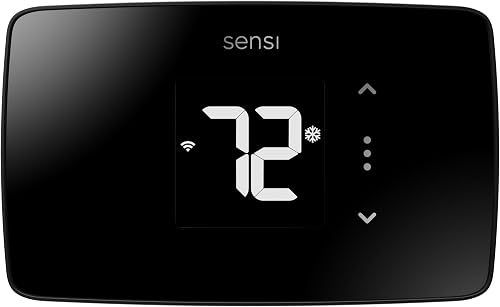
The ST55 pairs a familiar button layout with Wi-Fi, flexible scheduling and usage reports. It fits buyers who want smart features without a touchscreen.
Pros
- Physical buttons
- Usage reports and equipment alerts
- C-wire not required in most applications
Cons
- C-wire needs depend on the HVAC system
- Check system compatibility before buying
The Sensi ST55 suits you if you want Wi-Fi scheduling and remote control while keeping physical buttons on the wall. Its familiar format also fits a replacement where you want to use the same wall space without patching and painting.
Flexible scheduling, usage reports and equipment alerts support day-to-day energy management. Sensi says the thermostat can help save about 23% on HVAC energy, though your results depend on your schedule, equipment and settings.
Choose it if simple controls and maintenance reminders matter more than a large touchscreen. Skip it if your HVAC setup requires a C-wire and you want a model with a clearly specified included power adapter; the ST55's wiring needs vary by application.
ecobee Smart Thermostat Essential: Best for touchscreen fans
- ENERGY STAR certified
- Color touchscreen and app control
- Schedule assistant and humidity detection
- Works with Apple HomeKit, Google Assistant and Alexa
The Essential combines a color touchscreen with app control, schedule tools and energy-use tracking. Check ecobee's compatibility checker and plan for a separately sold Power Extender Kit if your home lacks a C-wire.
Pros
- Color touchscreen
- Schedule assistant and humidity detection
- Compatible with several major smart home systems
Cons
- Power Extender Kit is sold separately
- Check compatibility for your system
Choose ecobee Essential if you prefer adjusting temperature on a color touchscreen or through an app. Its schedule assistant, humidity detection and energy-use tracking make it a good fit for households that want more context about daily operation.
It works with Apple HomeKit, Google Assistant and Alexa. ecobee says it is compatible with 85% of systems, but that broad figure does not replace checking your exact equipment with its compatibility checker.
If your home lacks a C-wire, ecobee's Power Extender Kit is sold separately. A SmartSensor is also available separately for measuring temperature and movement in another room.
Choose this thermostat if its touchscreen and scheduling tools suit your routine. Skip it if you need a C-wire solution included in the box or don't want to check compatibility before installation.
Honeywell Home RTH9585WF Wi-Fi Color Thermostat: Best for display customization
- ENERGY STAR certified
- Customizable color touchscreen
- Monthly energy reports and tips
- C-wire required
A customizable touchscreen and monthly energy reports suit buyers who want schedules and a clear display. It requires a C-wire and does not work with electric baseboard heat.
Pros
- Customizable color touchscreen
- Monthly energy reports and personalized tips
- Flexible programming options
Cons
- C-wire required
- Not compatible with electric baseboard heat
Honeywell Home's RTH9585WF is a fit for households that want thermostat settings on a customizable color touchscreen. It combines flexible programming with app access and monthly energy reports that include tips for reducing energy use.
This model requires a C-wire and does not work with 120–240 V electric baseboard heat. It supports forced air, hot water, steam and heat pumps with electric backup, so identify your system before choosing it.
The fan can run continuously, automatically with heating or cooling, or on a circulate setting. Choose it if you like changing display colors and want monthly reports; skip it if you lack a C-wire or use electric baseboard heat.
Sensi Touch 2 Smart Thermostat: Best for room balancing
- ENERGY STAR certified
- Touchscreen and app control
- Compatible with Sensi Room Sensors sold separately
- C-wire required
The Touch 2 adds a touchscreen and supports separate Sensi Room Sensors for balancing temperatures around the home. Its C-wire requirement makes wiring checks especially important.
Pros
- Compatible with Sensi Room Sensors
- Usage reports and maintenance reminders
- Touchscreen control
Cons
- C-wire required
- Room sensors sold separately
The Sensi Touch 2 suits homes where a touchscreen is useful and room-to-room temperature differences are a concern. It can pair with Sensi Room Sensors, sold separately, to help balance temperatures throughout the home.
Its scheduling, remote access and usage reports offer tools for managing HVAC use. Sensi says it can help save about 23% on HVAC energy, but actual results depend on the home and the way you set it up.
Choose it if you have a C-wire and want the option to add room sensors later. Skip it if your wiring lacks a C-wire and you don't want to arrange a compatible power solution.
Sensi Lite Smart Thermostat: Best for app-first homes
- ENERGY STAR certified
- Flexible schedules, geofencing and usage reports
- C-wire not required in most homes
- Wi-Fi app control
The Lite offers app control, scheduling and geofencing in a simple thermostat format. Some systems, including heating-only, cooling-only and heat pump systems, need a C-wire or compatible power accessory.
Pros
- Flexible schedules and geofencing
- C-wire not needed in most homes
- Usage reports
Cons
- Some systems need a C-wire or power accessory
- Check compatibility with your HVAC setup
The Sensi Lite fits buyers who prefer using an app and want schedules, geofencing and usage reports in a simple thermostat format. You can adjust home HVAC settings remotely from a smartphone or tablet.
Sensi says a C-wire is not needed in most homes, but some systems need one or a compatible power accessory. That includes some heating-only, cooling-only and heat pump setups, so check the exact wiring before buying.
Privacy is another reason to consider it: Sensi says it won't sell personal information or use thermostat activity data for targeted advertising. Choose it if app control is your priority; skip it if you need a touchscreen-first experience or can't confirm power compatibility.
Honeywell Home X7B Smart Thermostat: Best for larger displays
- ENERGY STAR certified
- 4.3 in customizable touchscreen
- Matter certified
- C-wire required; adapter voucher included
The X7B pairs a customizable 4.3 in display with humidity monitoring and Matter support. Confirm that your HVAC system is compatible and account for its C-wire requirement.
Pros
- Customizable 4.3 in display
- Matter certified
- Adapter voucher included for homes without a C-wire
Cons
- C-wire required
- Does not work with electric baseboard heat
Honeywell Home's X7B suits buyers who want a larger, customizable screen and Matter support. Its 4.3 in display can change color and style, and the thermostat monitors indoor humidity.
It supports specified heat pump systems with electric backup, conventional systems, hot water heat and forced air. It requires a C-wire; a voucher for a Honeywell Home C-Wire Adapter is included for homes that need one.
The X7B does not work with electric baseboard heat. Choose it if the display and smart home compatibility match your priorities; skip it if your equipment falls outside the supported system types or you want a thermostat that works without a C-wire.
Cielo Smart Thermostat Eco: Best for vacation scheduling
- ENERGY STAR certified
- Schedules, geofencing and vacation mode
- C-wire adapter included
- Works with most 24 V HVAC systems
The Eco brings schedules, geofencing and vacation mode to many 24 V HVAC setups. Check the system details and wiring before choosing it, especially for multi-stage equipment.
Pros
- C-wire adapter included
- Multiple scheduling options
- Works with several smart home platforms
Cons
- Compatibility depends on HVAC wiring and stages
- Check the system fit before buying
Cielo Smart Thermostat Eco is suited to compatible 24 V systems and households that want several ways to set a routine. Custom or preset schedules, geofencing and vacation mode can adjust heating and cooling around when you are home.
The included C-wire adapter may help if your wall wiring lacks a C-wire. Cielo describes support for gas, electric, oil, hot water, heat pump and geothermal systems, but the supported stages and terminals still need to match your equipment.
Its app also shows energy-use patterns, and it works with Alexa, Google Assistant, Siri Shortcuts, SmartThings, IFTTT, Home Assistant and Cielo Linked. Choose it if you want broad smart home options and vacation settings; skip it until you have verified multi-stage compatibility.
Mysa Smart Thermostat for Heating and Cooling: Best for heat pump routines
- ENERGY STAR certified
- 7-day scheduling and geofencing
- C-wire required and sold separately
- Designed for most 24 V central HVAC systems
Mysa offers 7-day schedules, geofencing and vacation mode for most 24 V central HVAC systems. It requires a C-wire sold separately, and its Matter support is described as coming soon.
Pros
- 7-day scheduling and geofencing
- Vacation mode
- Humidity and temperature alerts
Cons
- C-wire required and sold separately
- Matter support described as coming soon
Mysa's thermostat is designed for most 24 V central HVAC systems, including furnaces, air conditioning and heat pumps. Seven-day schedules, geofencing and vacation mode suit households with changing routines or regular time away.
It requires a C-wire, sold separately. Mysa describes Matter support for Apple HomeKit, Google Home and Amazon Alexa as coming soon, so base your choice on the current app features rather than future support.
The app includes humidity monitoring, energy charts and shared access. Choose Mysa if its current controls and scheduling fit your home; skip it if you need a C-wire in the box or depend on Matter today.
How do you choose an ENERGY STAR thermostat?
Start by matching the thermostat to your HVAC equipment and wiring, then choose the controls and schedule features you'll use. Certification is valuable, but it cannot overcome a system mismatch.
Check your HVAC system and stages
Write down whether your home uses forced air, a boiler, a heat pump or electric baseboard heat. Also note the number of heating and cooling stages, since some thermostats support only specific combinations.
If you're unsure what system you have, use our guide to identify your thermostat type. A photo of the existing thermostat wiring and its labels can help you compare the setup with a new model's compatibility guidance.
Check the C-wire before you buy
Look behind the current thermostat for the wire connected to the terminal marked C, but don't rely only on wire color. A wire can be present in the wall and not connected, and some thermostats need a compatible power accessory when no C-wire is available.
The models here differ: the Sensi ST55 and Sensi Lite can work without a C-wire in many applications, while the Sensi Touch 2, Honeywell RTH9585WF and X7B require one. ecobee offers a separate Power Extender Kit, Cielo includes an adapter, and Mysa requires a C-wire sold separately.
If you aren't comfortable identifying wires or your system uses unusual terminals, get help from a qualified HVAC professional before removing the existing thermostat. For more preparation, read our thermostat fit and installation guide.
Pick a control style you will actually use
Physical buttons make direct changes easy without opening an app. A touchscreen can put schedules and settings on the wall, while app access helps when you want to adjust the temperature from another room or away from home.
Choose the Sensi ST55 for buttons and a traditional thermostat feel. The ecobee Essential and Honeywell models suit touchscreen users, while Sensi Lite is a practical option if app control is the main draw.
Match schedules to your household
A weekly schedule can lower heating or cooling when the home is empty or people are asleep, then restore a preferred setting around regular routines. Geofencing can adjust settings based on whether household members are nearby, while vacation mode offers a separate setting for time away.
Don't choose a thermostat for a feature you won't enable. If your schedule changes often, app control and flexible scheduling can be more useful than a fixed routine; if your week is predictable, a simple schedule may be enough.
Consider room differences and reporting
A thermostat reads conditions around its own location, so one central reading may not represent every room. Sensi Touch 2 supports separate Sensi Room Sensors, and ecobee offers a separate SmartSensor for temperature and movement readings in another room.
Energy reports can help you notice patterns, while maintenance reminders can prompt routine filter changes. These tools inform your decisions, but they don't repair HVAC problems or guarantee a particular energy reduction.
How do you set up an ENERGY STAR thermostat?
A good setup starts with compatibility and a record of the existing wiring, then follows the manufacturer's installation and app instructions. Don't guess at terminals or system settings if the labels don't match the guide.
Before removing the old thermostat, switch off power to the HVAC system at the breaker and confirm the system is off. Photograph the existing wiring and label each wire by its terminal, not by color.
Mount the new thermostat according to its instructions, connect only the wires supported by its wiring guide, and restore power after the faceplate is secure. Then complete the app setup, connect Wi-Fi if required and set the correct system type and heating or cooling stages.
Run a short heating or cooling call and confirm the system responds as expected. If it doesn't, stop and review the wiring and compatibility instructions rather than repeatedly changing settings.
How can you get useful results from an energy efficient thermostat?
Use a schedule that reflects real household routines and make small changes you can live with. The goal is consistent control that avoids heating or cooling an empty home more than needed.
Set occupied and away periods around when people usually leave and return. If your schedule varies, use remote controls or geofencing where available, and check that automatic changes match your actual routine.
Review energy reports or usage patterns after the system has operated through normal weeks. Adjust one schedule period at a time so you can tell which change helped your comfort and habits.
Keep the thermostat away from direct sunlight, drafts, doorways and heat sources where possible. A poor location can make its reading less representative of the rooms you want to keep comfortable.
Follow the HVAC maker's maintenance schedule and respond to filter reminders. A thermostat can send alerts, but clean filters and a maintained heating or cooling system remain part of reliable operation.
What common thermostat buying and setup mistakes should you avoid?
The most costly mistake is buying based on a feature list before confirming system compatibility. A thermostat can be ENERGY STAR certified and still be wrong for your equipment or wiring.
- Assuming every HVAC system is supported: Check system type, voltage and stages, especially with heat pumps, boilers and electric baseboard heat.
- Treating a C-wire as optional: Follow the exact model's wiring requirements. Some models work without one only in certain applications.
- Choosing by display alone: A large touchscreen won't help if the thermostat lacks the needed system support or smart home platform.
- Expecting guaranteed savings: Schedules and reports can help manage energy use, but household routines, settings and HVAC performance affect results.
- Turning on every automation at once: Start with a simple schedule, then add geofencing or other features after you understand how they change settings.
- Ignoring the thermostat's location: Sunlight, drafts or nearby heat can affect its reading and lead to settings that don't suit the rest of the home.
If you have electric baseboard heat, check compatibility carefully before considering the Honeywell models in this guide. Both the RTH9585WF and X7B are described as incompatible with that system type.
Which ENERGY STAR thermostat should you choose?
Choose the Sensi ST55 for familiar buttons, scheduling and remote access; pick ecobee Essential if you want a color touchscreen and schedule tools. The Honeywell RTH9585WF suits buyers who want a customizable display and monthly energy reports, provided the system has a C-wire and is not electric baseboard heat.
For optional room sensing, choose Sensi Touch 2 if you have a C-wire. Consider Sensi Lite for app-first control, Cielo Eco for vacation scheduling and broad platform support, or Mysa if its current app features suit your 24 V system and you can provide the required C-wire.
Before ordering, confirm wiring and HVAC compatibility, then choose the schedule and controls you'll use consistently. For more options across smart, digital and basic controls, see our thermostats for different home setups.
ENERGY STAR thermostat questions
What does ENERGY STAR certification mean for a thermostat?
ENERGY STAR certification identifies thermostats that meet the program's energy efficiency criteria. It does not promise a fixed amount of savings in every home.
Your schedule, HVAC system, home insulation and comfort settings all affect energy use. Compare the features you are likely to use, such as schedules, remote control or usage reports.
Do ENERGY STAR thermostats work with every HVAC system?
No. Compatibility depends on the thermostat's supported system types, wiring and heating or cooling stages.
Check your current thermostat wiring and HVAC equipment details before choosing a model. For a broader overview, see our thermostat system types guide.
Can an ENERGY STAR thermostat work without a C-wire?
Some models work without a C-wire in many applications, while others require one or a power accessory. Sensi ST55 and Sensi Lite do not need one in most applications or homes, and ecobee offers a separately sold Power Extender Kit.
Confirm the wiring needs for your specific system and chosen model before you start installation.
Will an ENERGY STAR thermostat lower my energy use?
It can help you manage heating and cooling with schedules, remote access and energy reports. The amount of energy you save depends on your home, HVAC system and settings.
For help deciding whether connected controls fit your habits, read whether a smart thermostat is worth it.
Our top 3 picks at a glance
-
1
-
2
-
3
Best for display customization
Honeywell Home RTH9585WF Wi-Fi Color Thermostat
8.3/10 our score
See it on Amazon
Frequently asked questions
What does ENERGY STAR certification mean for a thermostat?
ENERGY STAR certification identifies thermostats that meet energy efficiency criteria set by the program. It does not guarantee a fixed amount of savings in every home.
Your schedule, HVAC system, insulation and comfort settings affect energy use, so compare features you are likely to use.
Do ENERGY STAR thermostats work with every HVAC system?
No. Compatibility depends on the thermostat's supported system types, wiring and heating or cooling stages.
Check your current thermostat wiring and HVAC equipment details before choosing a model.
For a broader overview, see our thermostat system types guide.
Can an ENERGY STAR thermostat work without a C-wire?
Some models can work without a C-wire in many applications, while others require one or a power accessory. Sensi ST55 does not require a C-wire in most applications, and ecobee offers a separately sold Power Extender Kit for homes without one.
Confirm the wiring needs for your specific system.
Will an ENERGY STAR thermostat lower my energy use?
It can help you manage heating and cooling with features such as schedules, remote access and energy reports. The amount of energy you save depends on your home, HVAC system and settings.
For help deciding whether connected controls fit your habits, read whether a smart thermostat is worth it.


